
PicFusion Lab
X PhotoKitPhotography
4.4103.00 Reviews
- Version
- 1.2.4
- Installs
- 500.00K
- Age Rating
- Everyone
Screenshots
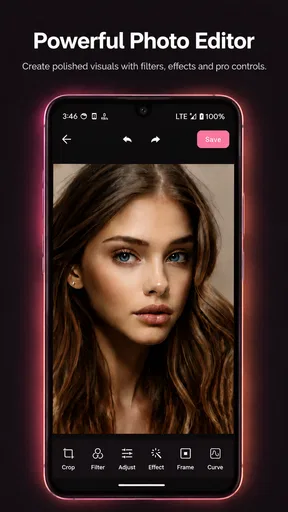
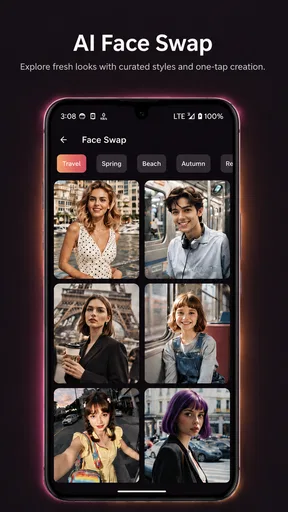
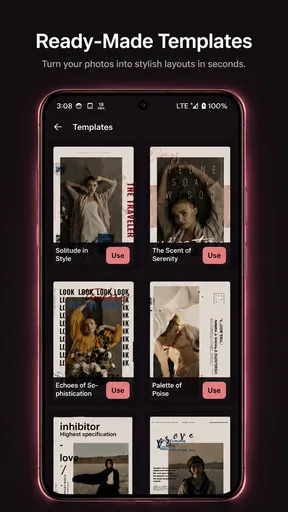
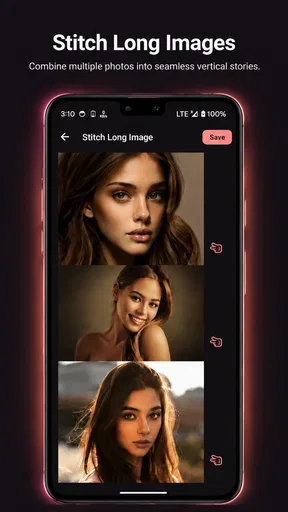
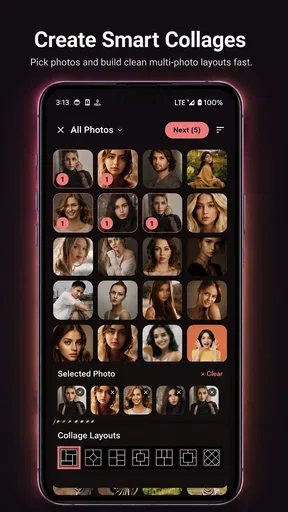
Our Review of PicFusion Lab
 Analysis by Appyee
I often reach for a photo app when I already have a picture in mind but the shot on my phone hasn’t quite got there. PicFusion Lab is a photography app from X PhotoKit, and its appeal is straightforward: it is meant to help you work toward better-looking photos rather than simply act as a camera replacement. I’d consider it when I want to improve an image after taking it, while keeping in mind that a short store description doesn’t tell me exactly which editing tools or workflow the app offers.
Starting with the photo you already have
The most useful way to approach PicFusion Lab is to begin with a specific picture and a specific problem. Maybe a meal looks flat under kitchen lighting, a travel photo feels less vivid than the place did, or a quick portrait needs a little polish before you share it. That is a more reliable starting point than opening an editor and pushing every available control just because it is there.
In my experience, that distinction matters especially in photo apps focused on quick improvement. A strong edit should help the subject read clearly without making the image look artificial. I’d keep the original available, make one considered change at a time, and pause to compare the result with the starting image. If the edit draws more attention to the effect than to the person, food, or scene, I would dial it back.
The app is free to download and is intended for everyone, so it is approachable for casual users as well as people who take pictures regularly. Its current version is 1.2.4, and it requires Android 7.0 or later. Those basics make it worth considering if you want to try a dedicated photo-editing app without paying upfront, though some purchases inside the app cost between $7.99 and $15.99 per item.
A practical editing routine
I’d start by choosing a photo with a clear subject and checking whether the original is worth working on. Editing can help with the look of an image, but it cannot reliably rescue a badly blurred subject or recover details that were never captured. Picking a stronger source photo first saves time and makes it easier to judge whether the app is helping.
Next, I’d make a restrained pass aimed at the main issue. If the picture feels dull, I’d test a modest improvement rather than trying to make every colour intense. If the subject seems lost in the frame, I’d think about whether a tighter composition would help before changing the overall look. These are useful habits in any editor, and they are especially valuable when trying a new app whose controls you are still learning.
Then I’d stop and look at the image at ordinary screen size. A change that seems pleasing when zoomed in may look too strong when the whole photo is visible. I’d also check faces, edges, and familiar colours before deciding an edit is finished. This small review step can prevent a polished-looking preview from becoming an image that feels oddly processed once it is shared.
I would not assume that every editing option is available for free. The app has in-app purchases, so if a tool or effect is presented as a paid item, I’d decide whether it solves a recurring problem before buying it. A one-off novelty may not justify the expense; a tool that fits a regular portrait or social-photo routine could be more worthwhile. The sensible approach is to try the free experience first and judge the paid choices against how often you expect to use them.
Making the edit fit the destination
A photo rarely ends with the edit itself. I might be preparing a picture to send to a friend, share in a group chat, or keep in a personal album. The best-looking version can differ depending on where it is going: a detailed image that works on a large display may be less effective as a small preview, while a heavily stylized edit may not suit a family snapshot I want to keep feeling natural.
For an everyday example, imagine I take a quick picture of a café dessert before meeting a friend. I would choose the clearest frame, make a subtle adjustment to improve its overall appearance, then check that the food still looks believable. Before sending it, I’d consider whether the image needs to stand on its own or whether a simple, unedited photo would feel more honest. That final choice is part of the workflow, not an afterthought.
When moving an edited image to another app, I’d inspect it after the handoff rather than trusting the preview alone. A receiving app may display a crop or preview differently, and a compressed share can make fine details less noticeable. Keeping a clean original alongside the edited copy is a practical safeguard: it gives me room to make a different version later without having to undo decisions from memory.
This is also where expectations matter. PicFusion Lab is a photo app, not a substitute for careful capture. If I need the best possible detail for a print or a serious photography project, I would pay more attention to the camera, lighting, focus, and original file. A phone editor is most convenient when the goal is a pleasing everyday image, not when the source material has to meet demanding technical standards.
How it fits among photo editors
Most people choosing a photography app are weighing convenience against control. The built-in editor is often the quickest option for a crop or a small correction, and it avoids adding another step to a familiar phone routine. A dedicated app such as PicFusion Lab is more appealing when I want a separate place to work on an image and am willing to explore what it offers beyond the basic tools I already use.
On the other hand, people who rely on precise manual adjustments, repeatable colour treatment, or a carefully organized editing process may prefer a more specialized editor. Those needs call for predictable control, not just a pleasing result. I would test PicFusion Lab on a few representative photos before treating it as my main tool, especially if I routinely edit the same kind of image and need consistent results from one picture to the next.
There is also a difference between editing for speed and editing for authorship. If I want a quick improvement before sharing, a focused app can be convenient. If I want to shape a distinctive visual style across a large body of work, I would look for a workflow that gives me dependable control and fits the way I store and revisit images. PicFusion Lab is easier to recommend for casual photo improvement than for a demanding, long-term professional process.
What the audience response suggests
PicFusion Lab has an average rating of 4.4 from around 922 ratings, with about 103 written reviews. It has also passed 500,000 installs, which suggests that it has reached a substantial group of users. I treat those figures as useful context, not proof that every feature will suit my habits: an app can work well for quick edits and still feel limited to someone who wants highly specific controls.
The developer is X PhotoKit. For me, the important question is less who made the app than whether its editing experience feels comfortable with my own photos. I’d try a portrait, a landscape, and an indoor snapshot if those are the images I normally take. That gives me a more honest sense of whether the app’s results suit my needs than testing only one unusually good picture.
Where the workflow can become frustrating
The biggest potential friction is uncertainty about the boundary between the free experience and paid items. Since purchases range from $7.99 to $15.99 each, I would avoid tapping through purchase prompts casually. Before paying, I’d make sure I understand what the item adds and whether I will use it often enough to matter. If I only edit a photo now and then, the free options may be all I need—or another editor with the specific tool I want may be a better choice.
Another limitation is that an editing app can encourage overworking an image. The more changes I make, the easier it is to lose sight of the scene I wanted to preserve. A useful rule is to make a change only when I can name the problem it addresses, then compare the final image against the original. If I cannot tell what improved, I would revert rather than keep adjusting.
It may also be the wrong choice if my priority is taking pictures rather than editing them. Someone seeking manual camera controls, a professional capture workflow, or a dedicated catalog for a large photo collection should choose an app built around those jobs. PicFusion Lab belongs in the post-capture part of the process, so I would not expect it to replace tools meant for shooting or organizing.
Finally, the Android requirement matters if I am installing it on an older device: it needs Android 7.0 or later. On a compatible phone, I’d still judge the experience with my own image sizes and sharing habits, since a workflow that feels quick on one device may not be equally comfortable for everyone. Trying it with a few ordinary photos is the most practical way to learn whether it earns a place in my routine.
My recommendation
I’d recommend PicFusion Lab to someone who wants a free starting point for improving everyday photos and is comfortable evaluating paid extras before buying them. Its photography focus, audience-wide age rating, and substantial user base make it an approachable option to try. I would use it with a light touch: choose a clear source image, make only purposeful edits, check the result at normal viewing size, and inspect the copy after sharing.
I would skip it if I needed advanced, consistent control for professional work, wanted a camera-first app, or disliked the possibility of in-app purchases. For casual pictures, though, it may be a useful stop between taking a photo and sending it along. My advice is to test it on the kinds of images you actually take, keep the original, and pay for an item only if it solves a repeated problem. With that approach, you can decide on the result rather than the promise of a better-looking picture.
Privacy and Permissions
See what permissions an app requests and how it handles your data.
- Photos/Media/Files
- read the contents of your USB storage, modify or delete the contents of your USB storage
- Storage
- read the contents of your USB storage, modify or delete the contents of your USB storage
- Wi-Fi connection information
- view Wi-Fi connections
- Other
- view network connections, full network access, run at startup, control vibration, prevent device from sleeping, Google Play license check
Verdict
Strengths of PicFusion Lab
- Combines multiple photos into one composition.
- Offers creative ways to personalize pictures.
- Makes casual photo experiments easy to try.
- Can help create distinctive images for sharing.
- Appeals to users who enjoy visual creativity.
Limitations of PicFusion Lab
- Results may vary depending on the source photos.
- Some effects may not suit every image.
- Fine details can look inconsistent in combined pictures.
- Creative options may take time to explore.
- Generated images may not match your exact expectations.
Other Releases by X PhotoKit
View All
X PhotoKit
Photography4.3
Similar Picks in This Category
View All
Google Photos
Google LLC4.4

Gallery
Google LLC4.2

Picsart AI Photo Editor, Video
PicsArt, Inc.3.9

B612 AI Photo&Video Editor
SNOW Corporation4.1

BeautyPlus-Selfie Photo Editor
PIXOCIAL TECHNOLOGY (SINGAPORE) PTE. LTD.4.5

Remini - AI Photo Enhancer
Bending Spoons4.1
Frequently Asked Questions
What is PicFusion Lab, and what can I use it for?
PicFusion Lab is an image-focused app intended for creating or editing pictures, potentially using creative effects and image-combination tools. The exact features can vary by version, so check the app listing and screenshots to confirm what is currently included. Before downloading, consider whether its editing options match your needs, such as making social posts, experimenting with visual styles, or preparing images for personal projects.
Is PicFusion Lab free to download and use?
The app may be free to install, but that does not necessarily mean every feature is free. Some apps offer optional subscriptions, in-app purchases, paid tools, or limits on exports and usage. Review the store page for pricing details, trial terms, and recurring charges before confirming a purchase. If a subscription is offered, check its renewal and cancellation conditions through your Apple or Google account.
Does PicFusion Lab use AI, and what should I know about its results?
PicFusion Lab may provide automated or AI-assisted image features, but the available tools and their capabilities should be verified in the current app description. Generated or transformed images can differ from what you expect, and results may depend on the quality of the input picture and the prompt or settings you provide. Review outputs before sharing them, particularly when accuracy, likeness, or commercial use matters.
What permissions and personal data might PicFusion Lab require?
An image-editing app may request access to photos or the camera so you can select pictures or capture new ones. Grant only the permissions needed for the features you plan to use, and consult the app’s privacy information and store listing to understand how images and other data are handled. Permissions, data practices, and available privacy controls can change with app updates, so check them before uploading sensitive images.
Which devices support PicFusion Lab, and how can I save or share finished images?
Compatibility depends on the app’s current requirements and whether you are installing its Android or iOS version. Check the relevant store listing for supported operating-system versions, device requirements, and regional availability before downloading. Saving and sharing options may also vary; look for export settings, image-quality choices, and any watermark or usage restrictions. Keep an original copy of important photos before editing them in any app.
